
Operating system for mushroom and microgreen farmsCEA beta
Less whiteboard juggling. More operational clarity.
FarmFlow brings batches, tasks, harvest windows, sensor alerts and costs into one operating system for indoor farms. Apply for the beta to get early access and product updates.
System impact
An operating layer for indoor farms
Product layer
real product screensSoftware for controlled production, not generic back-office work
Workflow engine
Built around cycles, racks, trays and bottlenecks
FarmFlow turns real production routines into a visible digital rhythm instead of forcing them into rigid admin screens.
Real product screens
Screens built for day-to-day growing.
Dashboard, batches, culture pipeline, planning, sensors and costs: FarmFlow keeps the full production chain visible for mushrooms and microgreens.
Dashboard
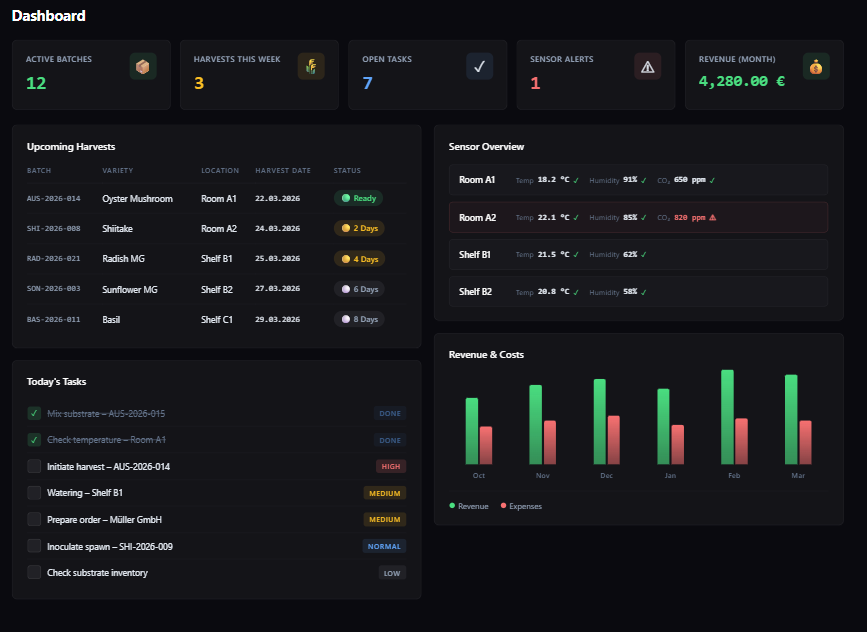
Start-of-day view: harvests, tasks, sensors
Batches, upcoming harvests, today's tasks, sensor alerts and month-to-date revenue on one home screen.
Batches
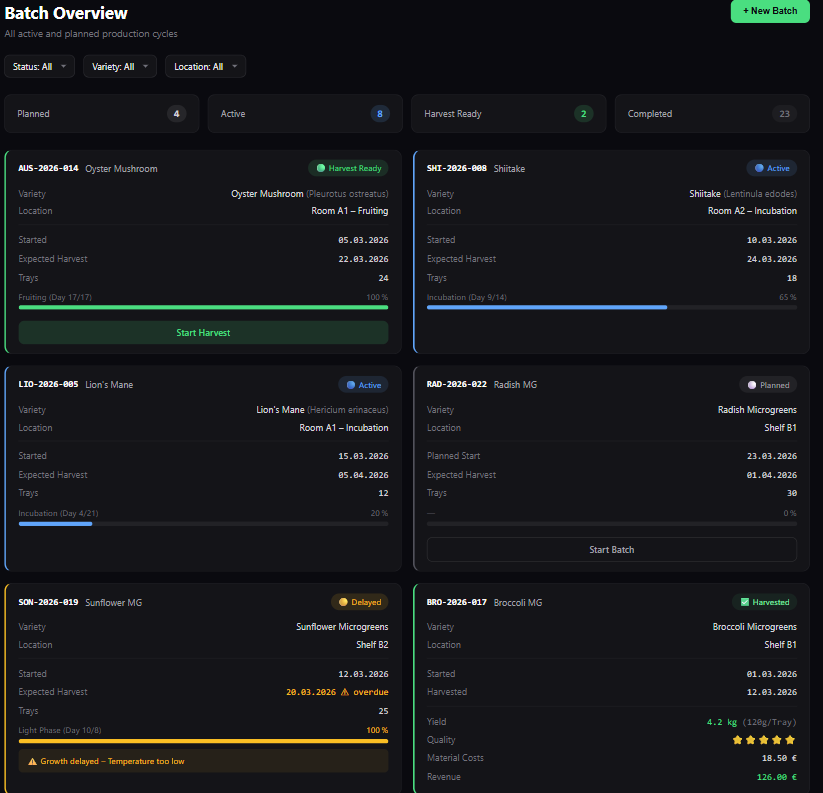
Batch run with status, phase and yield
Planned/active/delayed/harvested with phase timelines, progress and yield. Filter by variety, location or status.
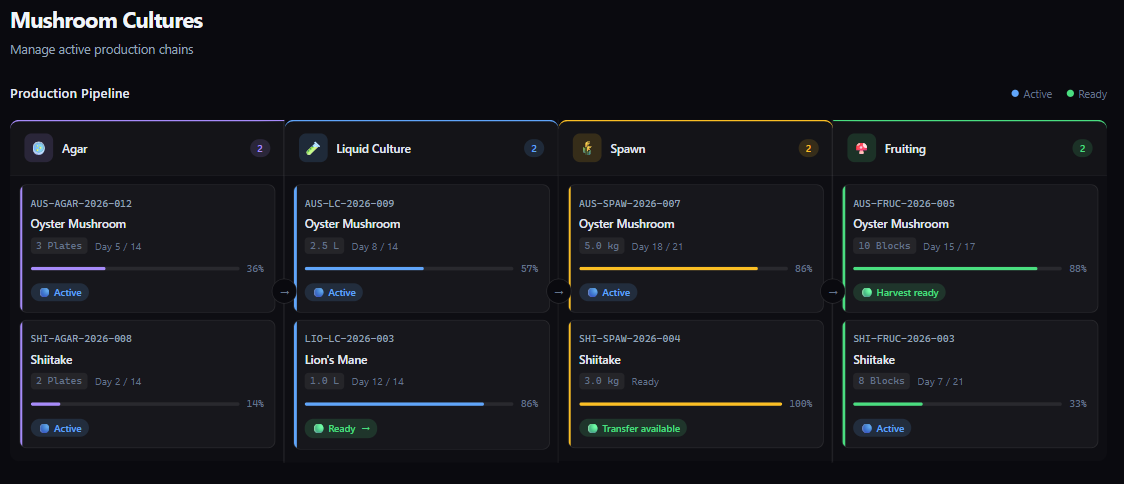
Culture pipeline
Agar -> LC -> Spawn -> Fruiting
Follow cultures through every stage and spot transfer windows and bottlenecks early, before they hit fruiting capacity.
Planning
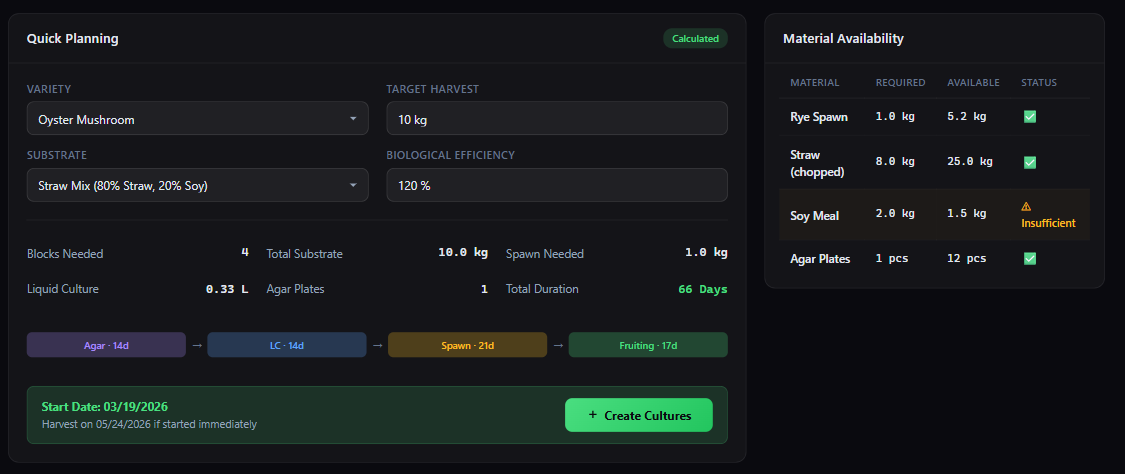
Plan backwards from the target harvest
Target yield + efficiency: compute blocks, substrate, spawn, LC and agar plates, with a live material availability check.
Sensors
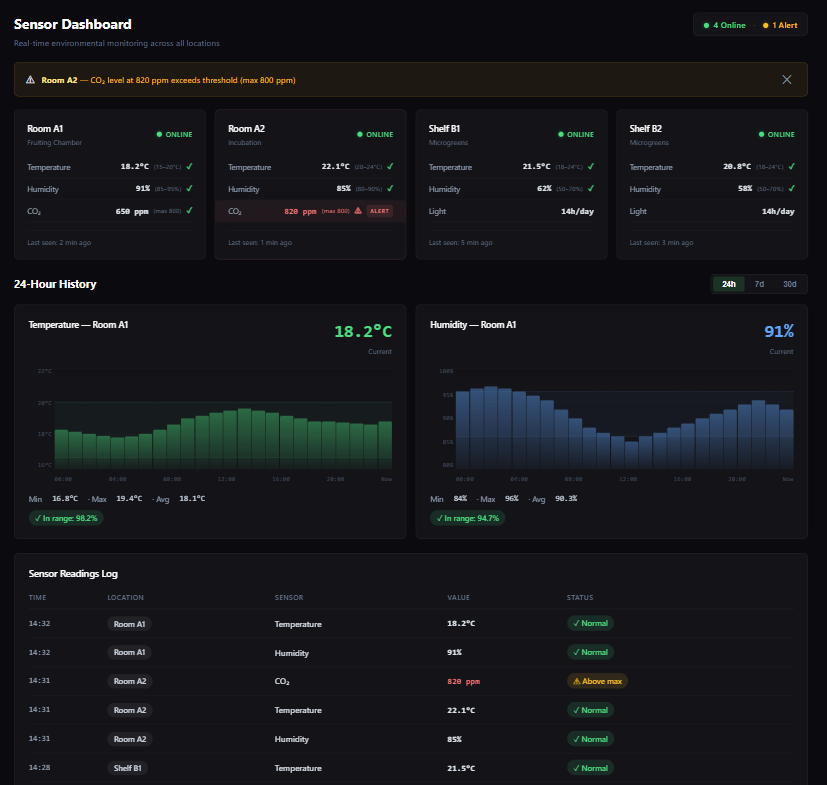
Climate control with alerts and history
Temperature, humidity, CO2 (ppm) and light hours per room, plus 24-hour charts and a reading log.
Costs
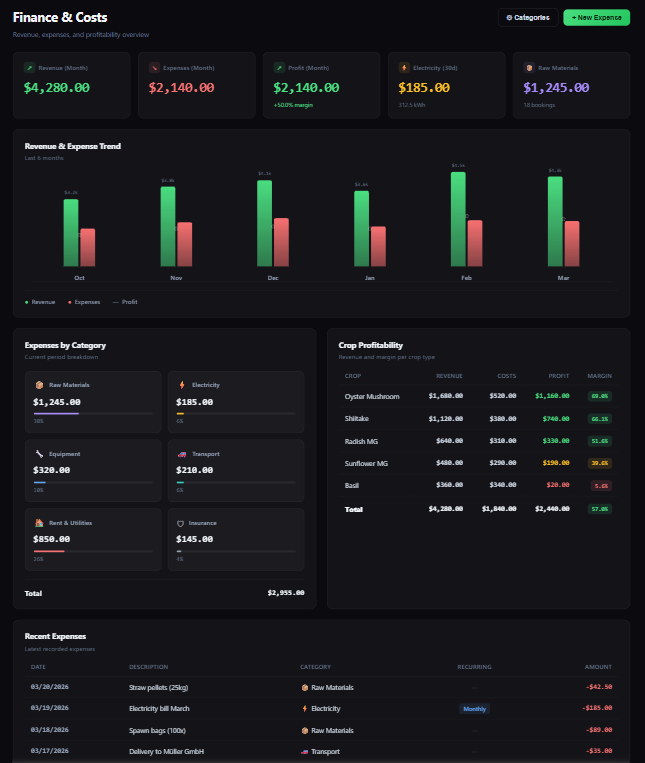
Profitability per crop, not spreadsheet guesswork
Revenue, expenses, margins and categories, plus profitability by crop and recent expenses as a live operating signal.
Ready for more operational clarity?
If you currently rely on spreadsheets, whiteboards or disconnected tools, the beta is likely a good fit.
Takes about 2 minutes.
Why FarmFlow
An ERP that understands the cadence of your farm.
Mushroom and microgreen operations deal with recurring cycles, perishability, tight timing windows and a lot of manual coordination. FarmFlow is designed around that reality.
See active batches, upcoming work and the next critical days without rebuilding the picture manually.
Move away from scattered sheets, notes and ad hoc routines toward one clearer operating layer.
Spot capacity constraints, weak process steps and scalable product lines earlier.
Core product areas
Four core areas for the daily farm rhythm.
The first FarmFlow release focuses on the operational center of the farm: what is running today, what becomes due next, and where time, material or attention are getting tight.
Run batches in a clear cadence
Set up recurring production cycles, track every batch across its stages and see immediately what is active, delayed or blocked.
Coordinate team work along the cycle
Make work visible per rack, tray or batch so critical tasks do not disappear between verbal handoffs, whiteboards and shift changes.
See harvest windows earlier
Connect active batches with upcoming harvest, packing and processing so output becomes easier to plan instead of something that surprises you.
Track materials and bottlenecks before they bite
Follow inputs, usage and critical in-process stages early enough to spot shortages before they hit the next production cycle.
Ready for more operational clarity?
If you currently rely on spreadsheets, whiteboards or disconnected tools, the beta is likely a good fit.
Takes about 2 minutes.
Who the beta is for
Most useful for farms with real operations, not just plans.
The beta is best suited for teams already producing or very close to launch, especially if they still rely on spreadsheets, whiteboards or disconnected tools.
Best fit
real production cycles, not just concept work
manual coordination that currently burns time
small teams with growing operational complexity
FAQ
What to know before applying.
The beta will start with a small group of farms so product feedback and iteration can stay tight.
No. FarmFlow is designed for both mushroom and microgreen farms, and the initial workflows are being shaped with both in mind.
No. What matters most is that you have real operational processes or are about to launch them. Growing small teams are highly relevant.
We review submissions, prioritize farms that match the beta profile and follow up by email. Then we quickly align on your needs and release access in small cohorts.
Pricing is still in progress. We will share beta terms and conditions after you apply.
We use your details only for beta prioritization and product updates. You can unsubscribe anytime.
No. The beta application also adds you to the update list so you receive product news and access updates.